
Education Center
What Are Text Snippets and How Do They Save Small Business Owners Hours Every Week?
Every day, small business owners answer the same questions over and over. What are your hours? Do you offer free estimates? How soon can you come out? Each one requires a few taps to respond — not a lot individually, but multiplied across dozens of inquiries a week, it adds up to a significant block of time spent typing the same information repeatedly. Text Snippets eliminate that. They are pre-written, one-tap replies that let you respond to common questions in seconds rather than minutes, without sacrificing the personal, professional quality of your responses.
TL;DR: Text Snippets are saved, pre-written text replies that can be sent with a single tap. They handle your most frequently asked questions — hours, pricing inquiries, appointment confirmations, directions — instantly and consistently. They are built into My Biz Suite's two-way messaging system and available on every paid plan.
Key Takeaways
- Text Snippets are pre-written replies you can insert into any text conversation with one tap.
- They reduce the time spent answering repetitive questions from minutes to seconds.
- Snippets ensure consistent, professional messaging across every customer interaction.
- They can be used manually or triggered automatically as part of a workflow.
- Text Snippets are included in all My Biz Suite paid plans, starting at $97/month.
What Exactly Is a Text Snippet?
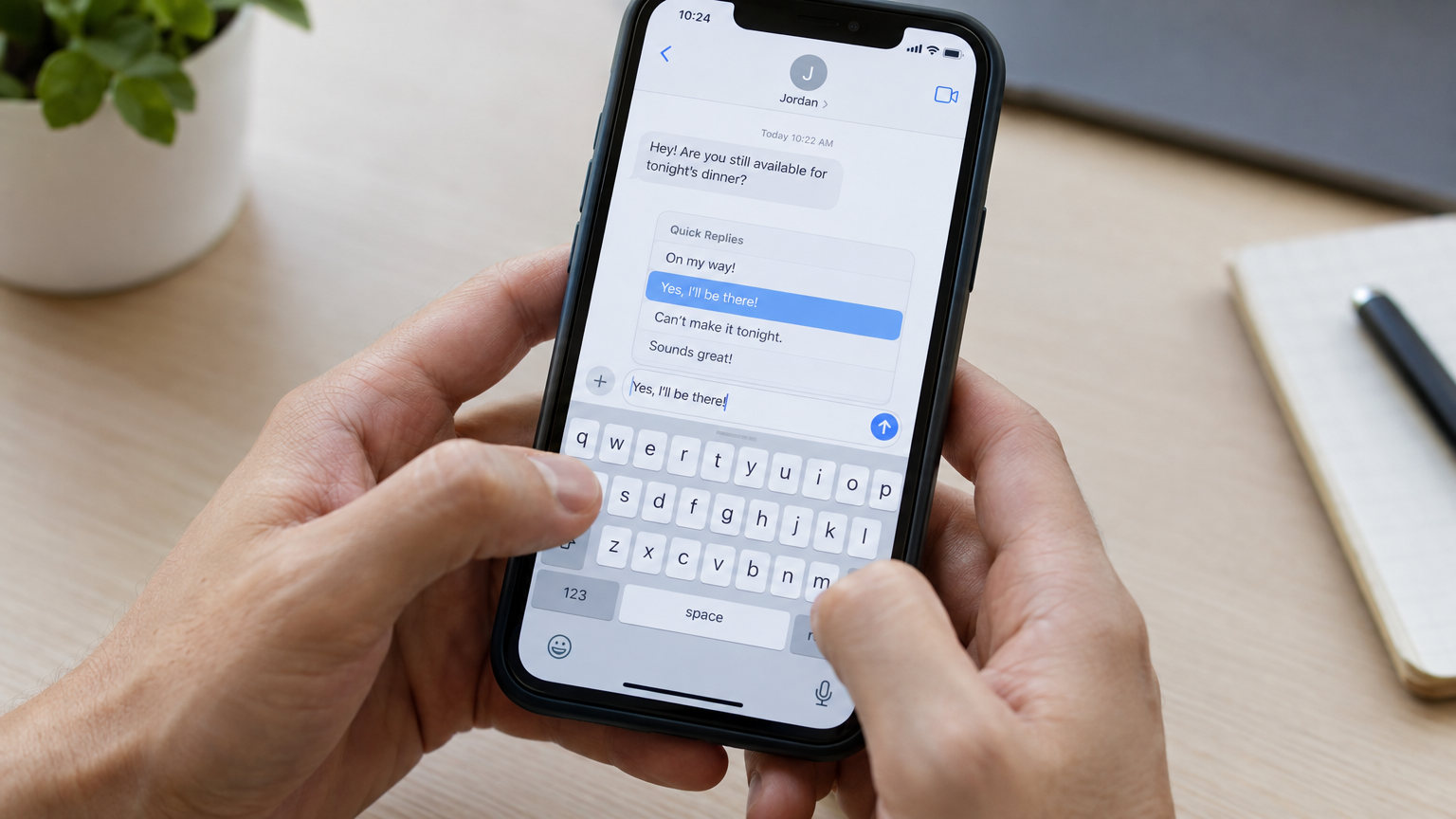
A Text Snippet is a pre-saved message template that lives inside your messaging system. When a customer texts you with a common question, instead of typing out a full response from scratch, you tap a snippet, it populates the reply field, and you hit send. Some snippets can include variable fields like the customer's first name or appointment time, so they feel personal even though they are pre-written.
Think of them like the autocomplete suggestions on your phone's keyboard — except instead of predicting a few words, they deliver a complete, polished, professional reply that accurately represents your business. This is a core part of the two-way text messaging ecosystem described in our pillar post: Why Is Two-Way Text Messaging the #1 Customer Communication Channel for Small Businesses?
The Questions Every Service Business Answers on Repeat
No matter your trade or profession, there is a set of questions every customer asks before they book:
- "What are your hours?"
- "Do you offer free estimates?"
- "Are you licensed and insured?"
- "How soon can you come out?"
- "What's your service area?"
- "Do you take credit cards?"
- "What does it cost for [standard service]?"
With Text Snippets, each of these gets a dedicated, perfectly worded reply that you set up once and use indefinitely. The answer is always accurate, always professional, and delivered in under three seconds. Without snippets, each reply is typed from scratch — and slight variations in wording mean slightly inconsistent impressions of your business over time.
How Snippets Fit Into Your Broader Messaging System
Text Snippets work alongside every other part of your messaging workflow. Here are the most common ways service businesses use them:
After-Hours Acknowledgment
A customer texts at 9 PM about a plumbing emergency. An automated snippet acknowledges the message, confirms you received it, and tells them when to expect a callback. The customer doesn't feel ignored and knows help is coming — even if you're asleep.
Initial Inquiry Response
When a new lead texts in after seeing your Google listing or ad, a snippet delivers a warm, professional first reply within seconds. This is critical for lead conversion — the first business to respond with a clear, helpful message wins a disproportionate share of the jobs.
Appointment Confirmation
Once a customer books, a snippet sends a confirmation with the date, time, and what to expect. Combined with automated appointment reminders, this dramatically reduces no-shows without requiring any manual effort from you.
Post-Job Follow-Up Bridge
After a job is complete and a Text-to-Pay link has been sent (as described in our post on how Text-to-Pay helps local service businesses get paid faster), a snippet can initiate a friendly follow-up that leads into a review request. The full post-job sequence runs on autopilot.
Snippets vs. Full Automation: What's the Difference?
Text Snippets are manually triggered — you choose which one to send based on the context of the conversation. Automated workflows, by contrast, trigger messages based on specific events (a form submission, a missed call, a job completion). Both have their place:
- Use snippets when you are actively in a conversation and want to reply fast without typing.
- Use automation for messages that should always go out at specific trigger points, like missed call follow-ups or appointment reminders.
Together, they cover the full spectrum of customer communication — from the scripted and automatic to the real-time and personal. For more on the automation side, see our post on how workflow automation saves small business owners 20+ hours a week.
Setting Up Your First Set of Text Snippets
Getting started is straightforward. Inside My Biz Suite, you create snippets in your settings and they are immediately available inside every text conversation. A practical first batch to set up:
- Hours & availability snippet — your business hours and the best way to book.
- Free estimate offer snippet — a clear yes/no with next steps for scheduling.
- Service area snippet — the cities or zip codes you cover.
- After-hours acknowledgment snippet — a professional reply that buys time without losing the customer.
- Booking confirmation snippet — date, time, address confirmation, and what to expect.
With just five snippets in place, you handle the majority of inbound customer questions without composing a new reply from scratch.
FAQ
Are Text Snippets different from auto-reply messages?
Yes. An auto-reply fires automatically in response to a trigger — like a missed call or a form submission. A Text Snippet is a saved template you choose to insert manually during an active conversation. Both are useful and serve different moments in the customer journey.
Can I personalize snippets with the customer's name?
Yes. My Biz Suite's messaging system supports merge fields, so snippets can include the customer's first name or other contact details, making the reply feel personal even though it's pre-written.
How many snippets can I create?
There is no practical limit. Most businesses find that a library of 10–20 well-crafted snippets covers the vast majority of their common communication needs.
Are Text Snippets only for SMS?
They work across the channels in your Consolidated Social Chat inbox, which means you can use them whether you're replying to a text, a Facebook Messenger message, or other connected channels. Learn more about the unified inbox in our post: How Does Consolidated Social Chat Help Small Businesses Stop Losing Leads Across Platforms?
Conclusion
The hours you spend typing the same answers to the same questions every week are hours you are not spending on billable work, on your family, or on growing your business. Text Snippets recover that time. They are a small feature with an outsized impact — fast to set up, instantly effective, and available on every My Biz Suite plan.
Stop retyping. Start building a library of snippets that reply faster and more consistently than you ever could manually.
Get Text Snippets and the full My Biz Suite messaging toolkit — visit My Biz Suite and start for as little as $97/month, no contract required.

Search for Articles Here

© 2026 My Biz Suite - All Rights Reserved.
*Several of our plans have additional communication fees for phone calls, SMS, email, and AI usage.